A business number, shared team inbox, templates and message follow-up.
MASAR INBOX / WHATSAPP FOR BUSINESS
Every conversation.
Closer to your team.
One workspace for WhatsApp, your customers and your team. Organise follow-up, prepare campaigns and add AI replies and connections to the systems you use.
80SAR / user / monthIncludes 1,000 AI replies each month
Arabic & EnglishTeams & departmentsAPI integrations
A conversation, connectedIllustrative example
N
Noura · New enquiryWhatsApp · Customer support
↗Today
NouraTyping…
↳Receive and route to the right department
Preparing a reply…
SSara · Orders teamPicks up with the full conversation
01Customer is typing
01 / YOUR CHANNELS, ORGANISEDDifferent channels.
Different channels.
One connected team.
We scope your channels, connect what your accounts support and organise sales, support and orders into department queues.
Organise Instagram enquiries, subject to account eligibility and permissions.
Snapchat
Leads from advertisingReceive lead-form enquiries with campaign context and department routing.
Website chat
From your site to your teamA visitor chat widget, routing enquiries to the right department within your activation scope.
Ready channels and activation timelines are confirmed in your proposal. Snapchat here covers lead-ad forms, not a general direct-message inbox.
02 / EXPLORE MASAR INBOXClick. Explore.
Click. Explore.
See how it works.
Open a conversation, try a reply and explore contacts, AI, campaigns and reports. An interactive experience with fictional data, plus real app captures in a separate tab.
مMasar InboxYour workspace
Interactive demoFictional data · Explore freely · No messages or data are sent outside this page
N
Noura AlotaibiOrder #1042 follow-up
Orders
Contacts
Find a fictional customer, then explore their profile or conversation.
Noura Alotaibi
Active orderFollowing up on delivery for order 1042.
- Channel
- Department
- Orders
- Data
- Fictional demo profile
Recent activity
- Asked about the delivery date
- Routed to the orders team
AI assistant
Choose sources and test a local sample reply. Your question is not sent to an AI model.
Enable the demo assistant
A local setting for this playground only.
Hand unknown questions to a person
Selected knowledge topics
Ask about opening hours, an order or a booking, then change the selected sources.
Campaigns
Choose an audience and template, then review the outcome. This local simulation sends no messages.
Customer follow-up campaign
Demo draft- Audience size
- 48
- Excluded in the example
- 4
- Eligible for simulation
- 44
The example excludes opted-out or unconfirmed recipients.
Personalized preview
Run the simulation to see an audience summary here.
Reports
Explore fictional figures by period and report. These are not actual customer or campaign results.
200Sample sent
184Sample delivered
123Sample read
Fictional campaign detail
| Campaign | Sent | Delivered | Read |
|---|---|---|---|
| Interested customers | 120 | 108 | 72 |
| Order updates | 80 | 76 | 51 |
Demo figures only. Sent, delivered and read overlap; they should not be added together.
Team & departments
Filter departments and change a fictional teammate’s availability. No real accounts are changed.
S
Sara
Orders
- Assigned sample chats
- 5
Availability for Sara
Available in this demo
A
Ali
Sales
- Assigned sample chats
- 3
Availability for Ali
Available in this demo
Y
Yara
Customer support
- Assigned sample chats
- 0
Availability for Yara
Away in this demo
R
Rami
Customer support
- Assigned sample chats
- 4
Availability for Rami
Available in this demo
Follow-up tasks
Complete a task or add a follow-up. Changes exist only within this playground.
1 / 2 tasks completed
Message templates
Choose a template and try personalization. Templates are not submitted or sent to customers.
Welcome & follow-up
These fictional templates do not represent actual WhatsApp approval.
Automation & routing
Change a routing rule and test it with a fictional enquiry.
Enable the sample routing rule
01New enquiry
↓02Sales
↓03Department follow-up
No rule is published and no actual conversation is changed.
Integrations
Try a fictional connection without API keys or any external requests.
Customer CRM
An example of showing customer stage in a conversation.
Not connectedData preview
Connect the demo, then simulate a data sync.
Actual integration depends on the customer's APIs, permissions and agreed scope.
Ready to explore — choose a sectionIn-page simulation
MASAR INBOXWORKSPACE
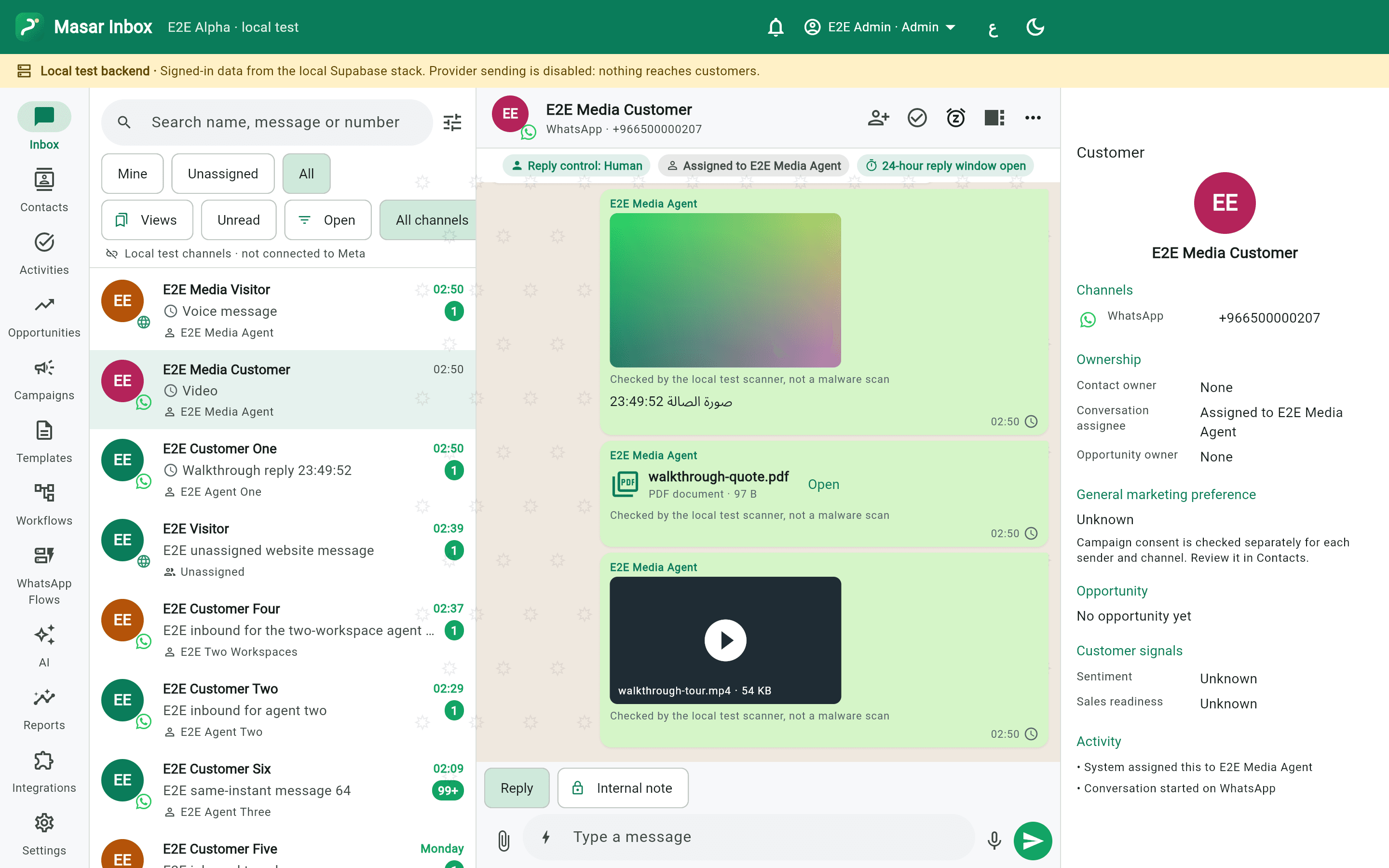
Conversations, customer details, notes and media in one workspace.
Actual app captures · Demo data · External sending disabled in this buildA workflow demonstration with fictional data and scripted replies. Changes are temporary and reset on refresh. Actual product capabilities are agreed at activation.
A shared team inbox
Conversations, media, saved replies and follow-up history in one workspace.
Departments, connected
Support, sales and orders. Route to the right teammate and transfer with a clear reason.
AI that knows your business
Replies grounded in the information you approve, clear usage limits and a route to a person.
Contacts with context
Customer profiles, tags, notes and conversation history. Pick up where you left off.
Follow-up that stays visible
Tasks, reminders and internal notes help your team complete requests without repeating questions.
Permissions for each role
Control who sees and handles conversations across owners, managers and teammates.
03 / CAMPAIGNS, STEP BY STEPA thoughtful message.
A thoughtful message.
For the right audience.
From selecting your audience to following up on replies. This example explains the service flow after the agreed channels and tools are activated.
From audience to follow-upIllustration
↗
Customer follow-up campaignChoose an audience
✓Interested in the serviceSegment
✓Existing customersSegment
✓Consent confirmedSegment
Opted-out contacts are excluded.
REPORTS THAT HELP YOU UNDERSTAND
Who received the message? Who needs follow-up?
Campaign reports separate sent, delivered, read when available and failed. Team reports help you understand conversation volume, assignment and response time.
↗ Campaign results↗ Department performance↗ AI reply usage↗ Customer follow-up
Report availability is defined in your plan and activation scope. Delivery states depend on provider updates; a missing read status does not mean a message was unread.
04 / CONNECT YOUR SYSTEMSHave an API?
Have an API?
Bring it into the workflow.
The Integrations plan connects Masar Inbox to your existing orders, appointments, CRM or other systems. We agree the data and actions, then implement that connection.
- Bring system information into the conversation
- Create a request or update a record through the integration
- Route the enquiry to a department and follow it up
Example integration uses. API availability, permissions and scope are reviewed before activation; custom work is quoted by scope.
A TWO-WAY CONNECTION
OrdersCRMBookings
API ↕
↗MASAR INBOXCONVERSATION + CONTEXT + ACTION
Your team works from one place
05 / ON THE DEVICES YOU USEAt your desk,
At your desk,
or on the move.
An Arabic and English experience. The app plan covers mobile, Mac and Windows alongside the browser interface, built around how your team works.
iPhoneiOS
AndroidMobile
MacBookmacOS
WindowsDesktop
Native apps are on the availability roadmap
Ready versions are confirmed in your proposal. Page screenshots show the browser interface; native releases have not yet been accepted for launch.
06 / STRAIGHTFORWARD PLANS
Choose what fits your team.
Monthly pricing per user. Start with everyday conversations, then add campaign, reporting and integration tools as you need them.
Adjust the team size to see your monthly subscription.
01 Everyday conversations
Essential
Bring customer conversations into one shared team workspace.
80SARper user / month
✦1,000AI replies / user / month
- ✓WhatsApp Business connection
- ✓Shared team inbox
- ✓Contacts, tags and conversation history
- ✓Assignment to staff and departments
- ✓Saved replies and message templates
- ✓Basic conversation follow-up reports
Monthly team subscription80 SAR
Request this plan02 Campaigns & follow-up
Growth
Grow with segmented campaigns, detailed reports and AI-assisted customer follow-up.
120SARper user / month
✦3,000AI replies / user / month
- ✓Everything in Essential
- ✓Segmented campaign audiences
- ✓Campaign review and scheduling after channel activation
- ✓Detailed campaign reports
- ✓Team activity and customer response follow-up
- ✓AI knowledge base with human handover
Monthly team subscription120 SAR
Request this plan03 Connected systems
Integrated
Everything in Growth, plus connections to your existing APIs within an agreed scope.
200SARper user / month
✦3,000AI replies / user / month
- ✓Everything in Growth
- ✓Connect your existing customer APIs
- ✓Orders, bookings or CRM sync through agreed APIs
- ✓Agreed workflow actions
- ✓Data and field mapping within the integration scope
Monthly team subscription200 SAR
Request this planPlatform subscription is separate from WhatsApp or provider messaging charges, where applicable. VAT, setup fees and activation scope are detailed in your quotation.
AI allowances are per user, per month. Integrations includes Growth’s 3,000 replies. Extra allowance or pooling is agreed in the proposal.
BEFORE YOU STARTA few useful
A few useful
details.
Connection and activation are scoped to your business and account eligibility, with a clear written proposal.
What does the per-user price include?
A monthly subscription for each user, with WhatsApp connection, the listed plan features and an AI reply allowance. Essentials includes 1,000 replies; Growth and Integrations include 3,000 per user per month. Setup and any additional work are defined in your quotation.
Are WhatsApp messaging charges included?
The platform subscription is separate from WhatsApp or provider messaging charges, where applicable. Usage charges depend on message category and recipient market. VAT treatment and any setup fees are specified in the quotation.
How are AI replies counted?
The listed allowance is monthly, per user. Your quotation defines what counts as a reply and any pooling or additional allowance. Plans do not promise unlimited usage or unagreed automatic overage charges.
Can I use my existing number?
We review your number, WhatsApp Business account setup and connection eligibility during onboarding. The connection method is confirmed before activation; number transfer or preservation of all settings is not assumed.
How do I send a campaign?
Choose an audience, check consent, prepare and preview a template, then review recipient eligibility. Proactive sending requires an approved template and an active connection. Ordinary replies follow the WhatsApp customer-service window, and opt-outs are respected.
What does Snapchat integration mean?
The proposed scope receives leads from Snapchat lead-ad forms and routes them to the right department. A general Snapchat direct-message inbox is not currently offered. API availability and account permissions are reviewed before implementation.
Are there mobile, Mac and Windows apps?
The plan covers iPhone, Android, macOS and Windows apps alongside the browser interface. Native releases are still planned; ready versions are confirmed in your proposal. These screenshots show the browser interface, not released native apps.
What can we connect through an API?
An orders system, appointments platform or CRM with a suitable API and permissions, for example. Your quotation defines the systems, data and actions, followed by the agreed implementation. New API development or additional custom work is scoped separately.
LET’S CONNECTLet’s put a proposal
Request a quoteLet’s put a proposal
together for your team.
Tell us your team size, channels and systems. We’ll outline the plan, scope of work and activation steps.